
曲线及几何体
大约 6 分钟
曲线及几何体
圆弧顶点
- 生成圆弧顶点数据
const R = 100; // 半径
const N = 100; // 分段数
const sp = (2 * Math.PI) / N; // 两个邻点间隔弧度
const points = []; // 圆弧顶点数据

for (let i = 0; i <= N; i++) {
	const angle = sp * i; // 当前弧度
	// 计算x、y
	const x = R * Math.cos(angle);
	const y = R * Math.sin(angle);
	points.push(x, y, 0);
}

const vertices = new Float32Array(points);
const geometry = new THREE.BufferGeometry();
const attributes = new THREE.BufferAttribute(vertices, 3);
geometry.attributes.position = attributes;

const material = new THREE.LineBasicMaterial({
	color: 0x00ff00,
});

// 绘制线
const mesh = new THREE.Line(geometry, material);
scene.add(mesh);
- setFromPoints(arr)
可将数组 arr 中的坐标数据提取出来,并赋值到几何体中。
const R = 100; // 半径
const N = 100; // 分段数
const sp = (2 * Math.PI) / N; // 两个邻点间隔弧度
const points = []; // 圆弧顶点数据

for (let i = 0; i <= N; i++) {
	const angle = sp * i; // 当前弧度
	// 计算x、y
	const x = R * Math.cos(angle);
	const y = R * Math.sin(angle);
	points.push(new THREE.Vector3(x, y, 0));
}
const geometry = new THREE.BufferGeometry();
geometry.setFromPoints(points);

const material = new THREE.LineBasicMaterial({
	color: 0x00ff00,
});
// 绘制线
const mesh = new THREE.Line(geometry, material);
scene.add(mesh);
生成曲线
getPoints(n):获取曲线上的 n+1 个点,返回包含这些点的数组,它考虑曲线斜率变化,不是等间距,在斜率变化快的位置返回的顶点更密集。 getSpacedPoints(n):获取曲线上的 n 个点,返回包含这些点的数组,它不考虑曲线斜率变化,每个点之间等间距。
1. 椭圆线 EllipseCurve
const arc = new THREE.EllipseCurve(0, 0, 120, 60); // x、y、宽、高
const points = arc.getSpacedPoints(100); // 得到101个Vector2点
const geometry = new THREE.BufferGeometry().setFromPoints(points);
const material = new THREE.PointsMaterial({
	color: 0x0000ff,
});
const ellipse = new THREE.Points(geometry, material);
scene.add(ellipse);
2. 圆形 ArcCurve
const arcCurve = new THREE.ArcCurve(0, 0, 50, 0, Math.PI); // x、y、半径、aStart、aEnd
const arcPoints = arcCurve.getSpacedPoints(50);
const arcGeometry = new THREE.BufferGeometry().setFromPoints(arcPoints);
const arcMaterial = new THREE.LineBasicMaterial({
	color: 0x00ff00,
});
const arcLine = new THREE.Line(arcGeometry, arcMaterial);
scene.add(arcLine);
3. 3D 样条曲线 CatmullRomCurve3
const arr = [
	new THREE.Vector3(-50, 20, 90),
	new THREE.Vector3(-10, 40, 24),
	new THREE.Vector3(20, 40, 98),
	new THREE.Vector3(234, 20, 90),
];

const boxGeometry = new THREE.BufferGeometry();
boxGeometry.setFromPoints(arr);
const boxMaterial = new THREE.PointsMaterial({
	color: 0x00ff00,
	size: 5,
});
const boxs = new THREE.Points(boxGeometry, boxMaterial);
scene.add(boxs);

// 生成样条曲线
const catmullRomCurve = new THREE.CatmullRomCurve3(arr);
const catmullPoints = catmullRomCurve.getSpacedPoints(100);
const catmullGeometry = new THREE.BufferGeometry().setFromPoints(catmullPoints);
const catmullLine = new THREE.Line(catmullGeometry, arcMaterial);
scene.add(catmullLine);
4. 2D 样条曲线
const points2 = [
	new THREE.Vector2(12, 32),
	new THREE.Vector2(90, 29),
	new THREE.Vector2(31, 89),
	new THREE.Vector2(-34, 149),
	new THREE.Vector2(-40, 75),
];
const curve2 = new THREE.SplineCurve(points2);
const geometry2 = new THREE.BufferGeometry().setFromPoints(
	curve2.getPoints(50)
);
const line2 = new THREE.Line(geometry2, arcMaterial);
scene.add(line2);

const box2Geometry = new THREE.BufferGeometry();
box2Geometry.setFromPoints(points2);
const box2Material = new THREE.PointsMaterial({
	color: 0xff0000,
	size: 5,
});
const boxs2 = new THREE.Points(box2Geometry, box2Material);
scene.add(boxs2);
5. 贝塞尔曲线
贝塞尔曲线:二维二次贝塞尔曲线(QuadraticBezierCurve)、二维三次贝塞尔曲线(QuadraticBezierCurve3)、三维二次贝塞尔曲线(CubicBezierCurve)、三维三次贝塞尔曲线(CubicBezierCurve3)
区别点:
- 二维贝塞尔曲线、三维贝塞尔曲线区别点在于 Vector2 和 Vector3,前者是作用于 x0y 平面上,后者是作用于整个三维空间中。
- 二次与三次区别:三次比二次多一个控制点
// 二维二次贝塞尔曲线
const quadraticPoints = [
	new THREE.Vector2(-80, 12),
	new THREE.Vector2(90, 60),
	new THREE.Vector2(80, 10),
];

const quadraticCurve = new THREE.QuadraticBezierCurve(
	quadraticPoints[0], // 起始点
	quadraticPoints[1], // 控制点
	quadraticPoints[2] // 结束点
);
const quadraticArray = quadraticCurve.getPoints(50);
const quadraticGeometry = new THREE.BufferGeometry().setFromPoints(
	quadraticArray
);
const quadraticMaterial = new THREE.LineBasicMaterial({
	color: "red",
});
const quadraticLine = new THREE.Line(quadraticGeometry, quadraticMaterial);
scene.add(quadraticLine);
6. CurvePath:曲线路径 可以创建一个曲线路径,这个路径可以由多个曲线组成
const curvePath = new THREE.CurvePath();
const R = 80;
const H = 200;
const line1 = new THREE.LineCurve(
	new THREE.Vector2(R, H),
	new THREE.Vector2(R, 0)
);
const arcLine2 = new THREE.ArcCurve(0, 0, R, 0, Math.PI, true);
const line3 = new THREE.LineCurve(
	new THREE.Vector2(-R, 0),
	new THREE.Vector2(-R, H)
);
curvePath.curves.push(line1, arcLine2, line3);

const curvePathArr = curvePath.getPoints(16);

const curvePathGeometry = new THREE.BufferGeometry().setFromPoints(
	curvePathArr
);
const curvePathMaterial = new THREE.LineBasicMaterial({
	color: "#2890ff",
});
const curvePathLine = new THREE.Line(curvePathGeometry, curvePathMaterial);
scene.add(curvePathLine);

const box3Geometry = new THREE.BufferGeometry();
box3Geometry.setFromPoints(curvePathArr);
const box3Material = new THREE.PointsMaterial({
	color: 0xff0000,
	size: 5,
});
const boxs3 = new THREE.Points(box3Geometry, box3Material);
scene.add(boxs3);
7. 管道 TubeGeometry:基于一个 3D 曲线路径,生成一个管道几何体
let path = catmullRomCurve;
let tubeGeometry = new THREE.TubeGeometry(path, 100, 3, 30, false); // 路径、管道分段数、管道半径、管道圆弧细分数、是否闭合
let tubeMaterial = new THREE.MeshStandardMaterial({
	color: 0x00ff00,
	side: THREE.DoubleSide,
});
let tube = new THREE.Mesh(tubeGeometry, tubeMaterial);
scene.add(tube);
8. 旋转成型 LatheGeometry
利用一个 2D 轮廓,经过旋转生成一个 3D 几何体
const lathePoints = [
	new THREE.Vector2(50, 50),
	new THREE.Vector2(30, 0),
	new THREE.Vector2(50, -50),
];

const latheGeometry = new THREE.LatheGeometry(lathePoints, 100, 0, Math.PI); // path、圆周方向细分数、开始角度(默认0)、旋转角度(默认2π)
const latheMaterial = new THREE.MeshBasicMaterial({
	color: "#2890ff",
	side: THREE.DoubleSide,
});

let lathe = new THREE.Mesh(latheGeometry, latheMaterial);
scene.add(lathe);
9. 轮廓填充 ShapeGeometry
通过一些路径点,生成一个多边形几何体
const shapePoints = [
	new THREE.Vector2(-50, -50),
	new THREE.Vector2(-60, 0),
	new THREE.Vector2(0, 50),
	new THREE.Vector2(60, 0),
	new THREE.Vector2(50, -50),
];

const shape = new THREE.Shape(shapePoints); // 坐标
const shapeGeometry = new THREE.ShapeGeometry(shape); // 几何体
const shapeMaterial = new THREE.MeshBasicMaterial({
	color: "#2890ff",
	side: THREE.DoubleSide,
});

const shapeMesh = new THREE.Mesh(shapeGeometry, shapeMaterial);
scene.add(shapeMesh);
10. 拉伸成型 ExtrudeGeometry
将 Shape 平面进行拉伸,得到一个几何体
const extrudeGeometry = new THREE.ExtrudeGeometry(shape, {
	depth: 20, // 拉伸长度
	bevelEnabled: true, // 拉伸出的几何体是否斜角,默认true
	bevelSize: 5, // 斜角垂直拉伸方向长度
	bevelThickness: 5, // 斜角水平拉伸方向长度
	bevelSegments: 20, // 斜角细分数
});
const extrudeMaterial = new THREE.MeshBasicMaterial({
	color: "#2890ff",
	side: THREE.DoubleSide,
});
const extrudeMesh = new THREE.Mesh(extrudeGeometry, extrudeMaterial);
scene.add(extrudeMesh);
11. 扫描成型 ExtrudeGeometry
将 Shape 沿着曲线扫描成一个几何体
// shape:定义扫描轮廓 path:扫描轨迹(3D样条曲线)
const extrudePath = new THREE.CatmullRomCurve3([
	new THREE.Vector3(-10, -50, -50),
	new THREE.Vector3(10, 0, 0),
	new THREE.Vector3(8, 50, 50),
	new THREE.Vector3(-5, 0, 100),
]);

const scanGeometry = new THREE.ExtrudeGeometry(shape, {
	extrudePath: extrudePath,
	steps: 100, // 沿着路径的细分数
});

const scanMaterial = new THREE.MeshBasicMaterial({
	color: "#2890ff",
	side: THREE.DoubleSide,
	wireframe: true,
});

const scanMesh = new THREE.Mesh(scanGeometry, scanMaterial);
scene.add(scanMesh);
12. 模型边界线EdgesGeometry
给模型设置一个模型边界线几何体
// 引入threejs
import * as THREE from "three";
// 引入轨道控制器
import { OrbitControls } from "three/addons/controls/OrbitControls.js";
// GLTF加载器
import { GLTFLoader } from "three/addons/loaders/GLTFLoader.js";

/* 创建三维场景 */
const scene = new THREE.Scene();

/* 创建相机 */
const camera = new THREE.PerspectiveCamera( // PerspectiveCamera透视投影相机
	50, // fov默认50
	window.innerWidth / window.innerHeight, //
	0.1,
	100000
);
// 设置相机位置
camera.position.set(150, 150, 150);
// 设置相机观察目标:接受坐标 or 物体
camera.lookAt(0, 0, 0);

/* 创建渲染器:需要放到最后 */
const renderer = new THREE.WebGLRenderer({
	// 抗锯齿
	antialias: true,
	// 深度冲突
	logarithmicDepthBuffer: true,
});
renderer.setSize(window.innerWidth, window.innerHeight); // 设置canvas画布宽高
renderer.render(scene, camera); // 执行一个渲染操作
// 修改渲染器编码方式
renderer.outputEncoding = THREE.sRGBEncoding;

// 添加自适应
window.addEventListener("resize", () => {
	renderer.setSize(window.innerWidth, window.innerHeight); // 设置canvas画布宽高
	camera.aspect = window.innerWidth / window.innerHeight; // 设置相机长宽比
	camera.updateProjectionMatrix(); // 当相机属性发生变化时,需要更新相机投影矩阵
});

document.body.appendChild(renderer.domElement); // 将canvas画布添加到html中

const render = () => {
	window.requestAnimationFrame(render);
	renderer.render(scene, camera);
};
render();

/* 添加坐标辅助器 */
const axesHelper = new THREE.AxesHelper(100);
scene.add(axesHelper);

/* 添加轨道控制器 */
const controls = new OrbitControls(camera, renderer.domElement);

/* 添加环境光 */
const ambientLight = new THREE.AmbientLight(0xffffff, 2);
scene.add(ambientLight);

const loader = new GLTFLoader();

loader.load("./建筑模型.gltf", gltf => {
	console.log(gltf);

	gltf.scene.traverse(item => {
		if (item.isMesh) {
			const material = new THREE.MeshStandardMaterial({
				color: 0xffffff,
				opacity: 0.5,
				transparent: true,
			});
			item.material = material;

			// 模型边界
			const geometry = new THREE.EdgesGeometry(item.geometry)
			const lintMaterial = new THREE.LineBasicMaterial({
				color: 0xffffff,
				linewidth: 1,
			});
			const line = new THREE.LineSegments(geometry, lintMaterial);
			item.add(line);
		}
	});
	scene.add(gltf.scene);
});
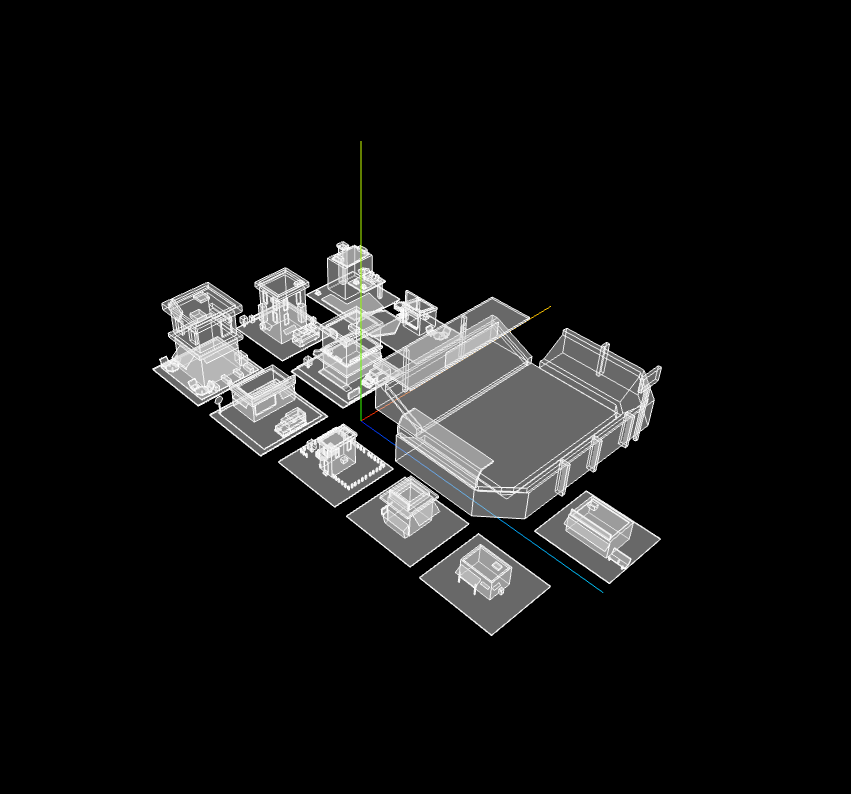
13. 顶点颜色
给geometry设置color属性,并开启vertexColors属性
// 顶点颜色
const pointsArr = [
	new THREE.Vector3(-50, 0, 0),
	new THREE.Vector3(0, 50, 0),
	new THREE.Vector3(50, 0, 0),
	new THREE.Vector3(0, -50, 0),
];
const pointGeometry = new THREE.BufferGeometry().setFromPoints(pointsArr);
const pointMaterial = new THREE.LineBasicMaterial({
	color: "#2890ff",
	size: 20,
	vertexColors: true,  // 允许顶点颜色
});
// 颜色
const colors = new Float32Array([1, 0, 0, 0, 0, 1, 0, 1, 0, 1, 0, 1]);
// 设置顶点颜色
pointGeometry.setAttribute("color", new THREE.BufferAttribute(colors, 3));

const pointMesh = new THREE.Line(pointGeometry, pointMaterial);

scene.add(pointMesh);
Loading...