
几何顶点 UV 坐标&纹理贴图
大约 2 分钟
几何顶点 UV 坐标&纹理贴图
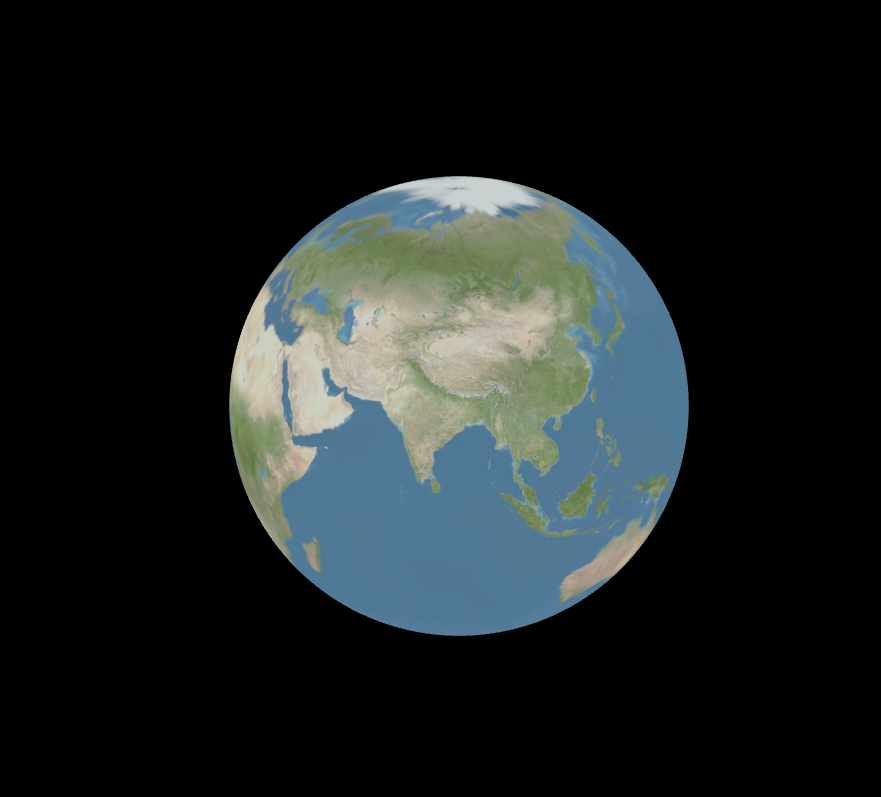
纹理贴图
- 创建纹理加载器 TextureLoader
- 加载纹理:入参为图片地址、返回 Texture 对象
- 纹理对象的 map 属性设置为纹理贴图
import * as THREE from "three";

/* 创建纹理贴图 */

// 纹理加载器TextureLoader:入参为图片地址,返回Texture对象
const geometry = new THREE.SphereGeometry(150, 200, 200);

// 创建纹理加载器
const load = new THREE.TextureLoader();

// 加载图片,返回纹理对象
const texture = load.load("./earth.jpg");

const material = new THREE.MeshLambertMaterial({
	map: texture, // 设置贴图
});

const mesh = new THREE.Mesh(geometry, material);

export default mesh;
UV 坐标
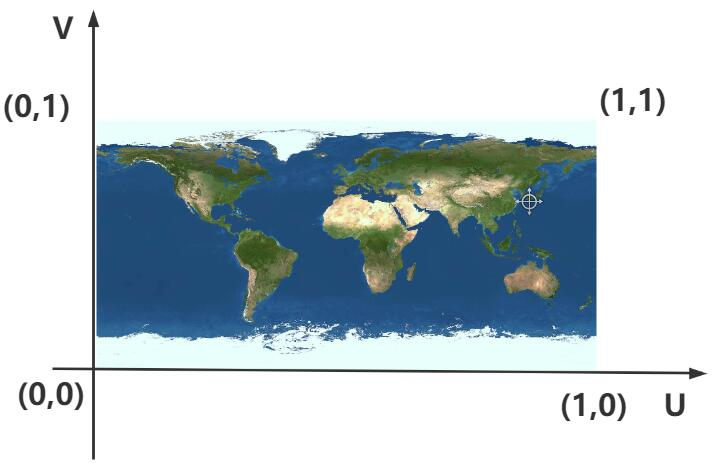
顶点 UV 坐标的作用是从纹理贴图上提取像素映射到网格模型 Mesh 的几何体表面上。
顶点 UV 坐标可以在 0~1.0 之间任意取值,纹理贴图左下角对应的 UV 坐标是(0,0),右上角对应的坐标(1,1)。
const geometry = new THREE.BufferGeometry();
const vertics = new Float32Array([0, 0, 0, 160, 0, 0, 160, 100, 0, 0, 100, 0]);
const attribute = new THREE.BufferAttribute(vertics, 3);
geometry.attributes.position = attribute;

// 设置顶点索引
const index = new Uint16Array([0, 1, 2, 0, 2, 3]);
geometry.index = new THREE.BufferAttribute(index, 1);

// 创建uv坐标
const uvs = new Float32Array([0, 0, 1, 0, 1, 1, 0, 1]);
const uvAttribute = new THREE.BufferAttribute(uvs, 2);
geometry.attributes.uv = uvAttribute;

const loader = new THREE.TextureLoader();
const texture = loader.load("./earth.jpg");

const material = new THREE.MeshBasicMaterial({
	// color: 0x00ff00,
	map: texture,
	side: THREE.DoubleSide,
});

const mesh = new THREE.Mesh(geometry, material);

// 创建圆形平面:CircleGeometry默认UV坐标就是一个圆形
const circleGeometry = new THREE.CircleGeometry(50, 100);
const circleMaterial = new THREE.MeshBasicMaterial({
	side: THREE.DoubleSide,
});
const circle = new THREE.Mesh(circleGeometry, circleMaterial);
const circleBg = loader.load("./tt.jpg");
circleMaterial.map = circleBg; // 设置纹理

// 案例:创建瓷砖
const planGeometry = new THREE.PlaneGeometry(100, 100);
const planMeterial = new THREE.MeshBasicMaterial({
	side: THREE.DoubleSide,
});
const plan = new THREE.Mesh(planGeometry, planMeterial);

// 加载瓷砖纹理
const cz = loader.load("./瓷砖.jpg");
// 设置纹理贴图
planMeterial.map = cz;

// 设置允许阵列
cz.wrapS = THREE.RepeatWrapping;
cz.wrapT = THREE.RepeatWrapping;

// 重复
cz.repeat.set(10, 10);

// 创建透明箭头
const planeGeometry = new THREE.PlaneGeometry(100, 100);
const planeMaterial = new THREE.MeshBasicMaterial({
	side: THREE.DoubleSide,
	transparent: true, // 开启透明,会将图片透明部分不渲染
});
const plane = new THREE.Mesh(planeGeometry, planeMaterial);
const compass = loader.load("./指南针.png");
plane.material.map = compass;

plane.rotation.x = -Math.PI / 2;
UV 动画
纹理对象的偏移属性.offset 实现 UV 动画效果。本质上是修改 UV 顶点坐标。
import * as THREE from "three";

const geometry = new THREE.PlaneGeometry(100, 30);
const material = new THREE.MeshBasicMaterial({
	color: 0xffffff,
	side: THREE.DoubleSide,
	transparent: true,
});

const mesh = new THREE.Mesh(geometry, material);
mesh.rotateX(Math.PI / 2);

const loader = new THREE.TextureLoader();
const wl = loader.load("./纹理3.jpg");
// 开启水平
wl.wrapS = THREE.RepeatWrapping;
wl.repeat.x = 15;
mesh.material.map = wl;

// render函数中:wl.offset.x +=0.01;
export { mesh, wl };
Loading...