
快速入门
大约 4 分钟
快速入门
1. 三要素
- 场景 scene:三维场景
- 相机 camera:将三维场景渲染到屏幕上
- 透视投影相机 PerspectiveCamera:模拟人眼
- 正交投影相机 OrthographicCamera
- 渲染器 render:执行渲染操作
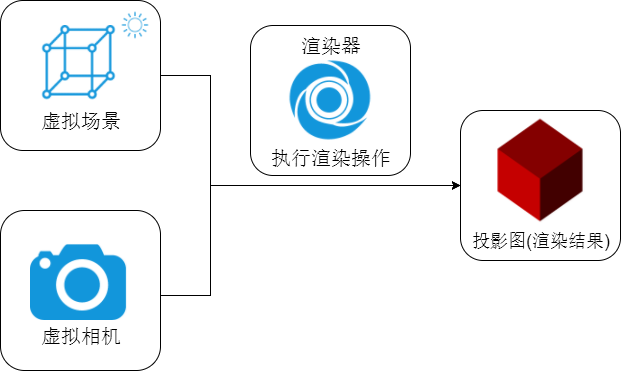
2. 创建基本场景
// 引入threejs
import * as THREE from "three";
// 引入轨道控制器
import { OrbitControls } from "three/addons/controls/OrbitControls.js";
// 引入帧率监视器
import Stats from "three/addons/libs/stats.module.js";

/* 创建三维场景 */
const scene = new THREE.Scene();

/* 创建相机 */
const camera = new THREE.PerspectiveCamera( // PerspectiveCamera透视投影相机
	30, // fov默认50
	window.innerWidth / window.innerHeight, //
	0.1,
	100000
);
// 设置相机位置
camera.position.set(1000, 1000, 1000);
// 设置相机观察目标:接受坐标 or 物体
camera.lookAt(0, 0, 0);

/* 创建渲染器:需要放到最后 */
const renderer = new THREE.WebGLRenderer({
	// 抗锯齿
	antialias: true,
});
renderer.setSize(window.innerWidth, window.innerHeight); // 设置canvas画布宽高
renderer.render(scene, camera); // 执行一个渲染操作
// 添加自适应
window.addEventListener("resize", () => {
	renderer.setSize(window.innerWidth, window.innerHeight); // 设置canvas画布宽高
	camera.aspect = window.innerWidth / window.innerHeight; // 设置相机长宽比
	camera.updateProjectionMatrix(); // 当相机属性发生变化时,需要更新相机投影矩阵
});

document.body.appendChild(renderer.domElement); // 将canvas画布添加到html中

/* 渲染事件 */
let i = 0;
// 计算间隔时间
const clock = new THREE.Clock();
const render = () => {
	i++;

	// 计算时差
	const spt = clock.getDelta() * 1000;
	// console.log("渲染间隔时间:", spt); // 16~17ms
	// console.log("渲染帧率:", 1000 / spt);  // 60左右

	window.requestAnimationFrame(render);
	renderer.render(scene, camera);
};
render();

/* 添加坐标辅助器 */
const axesHelper = new THREE.AxesHelper(50);
scene.add(axesHelper);

/* 添加轨道控制器 */
const controls = new OrbitControls(camera, renderer.domElement);

/* 屏幕像素比 */
console.log("屏幕像素比:", window.devicePixelRatio);
renderer.setPixelRatio(window.devicePixelRatio); // 设置屏幕像素比,避免模糊

/* 添加帧率监视器 */
const stats = new Stats();
document.body.appendChild(stats.domElement);
stats.setMode(0); // 0:帧率 1:刷新频率 2:每秒渲染次数
3. 添加光源
/* 添加点光源 */
const pointLight = new THREE.PointLight(0xffffff, 1.0); // 光源颜色、强度
pointLight.position.set(100, 100, 100);
scene.add(pointLight);
// 点光源辅助器
const pointLightHelper = new THREE.PointLightHelper(pointLight, 5);
scene.add(pointLightHelper);

/* 添加环境光 */
const ambientLight = new THREE.AmbientLight(0xffffff, 0.5);
scene.add(ambientLight);

/* 添加平行光 */
const directionalLight = new THREE.DirectionalLight(0xffffff, 1.0);
directionalLight.position.set(250, 150, 250);
scene.add(directionalLight);
// 平行光辅助器
const directionalLightHelper = new THREE.DirectionalLightHelper(
	directionalLight,
	5
);
scene.add(directionalLightHelper);
4. 几种常见几何体
/* 创建长方体物体 */
const boxGeometry = new THREE.BoxGeometry(10, 10, 10); // 长宽高
// 给定材质
const boxMaterial = new THREE.MeshBasicMaterial({
	// 不受光照影响
	// 基础网格材质
	color: 0x00ffff,
	transparent: true, // 允许透明
	opacity: 0.5, // 设置透明度
});
// 创建物体
const boxMesh = new THREE.Mesh(boxGeometry, boxMaterial);
// 修改物体的位置,默认位置为0,0,0
boxMesh.position.set(0, 0, 0);
// 将物体添加到场景中
scene.add(boxMesh);
const basicMaterial = new THREE.MeshBasicMaterial({
	color: 0x00ffff,
	side: THREE.DoubleSide, // 设置双面可见,默认FrontSide单面可见
});
// 球体
const spherGeometry = new THREE.SphereGeometry(20); // 半径
const spher = new THREE.Mesh(spherGeometry, basicMaterial);
spher.position.set(300, 300, 0);
scene.add(spher);
// 圆柱体
const cylinderGeometry = new THREE.CylinderGeometry(10, 10, 50); // 上半径、下半径、高度
const cylinder = new THREE.Mesh(cylinderGeometry, basicMaterial);
cylinder.position.set(250, 300, 0);
scene.add(cylinder);
// 圆锥
const coneGeometry = new THREE.ConeGeometry(10, 50); // 底半径、高度
const cone = new THREE.Mesh(coneGeometry, basicMaterial);
cone.position.set(200, 300, 0);
scene.add(cone);
// 矩形平面
const planeGeometry = new THREE.PlaneGeometry(100, 100); // 长、宽
const plane = new THREE.Mesh(planeGeometry, basicMaterial);
plane.position.set(100, 300, 0);
scene.add(plane);
// 圆平面
const circleGeometry = new THREE.CircleGeometry(50, 88); // 半径、分段数
const circle = new THREE.Mesh(circleGeometry, basicMaterial);
circle.position.set(-50, 300, 0);
scene.add(circle);
5. 材质
/* 漫反射材质 */
const boxMaterial2 = new THREE.MeshLambertMaterial({
	// 受光照影响
	color: 0x00ff00,
});
const box2 = new THREE.Mesh(boxGeometry, boxMaterial2);
box2.position.set(0, 40, 0);
scene.add(box2);

/* 高光网格材质 */
const wallGeometry = new THREE.PlaneGeometry(100, 100);
const wallMaterial = new THREE.MeshPhongMaterial({
	color: 0xff0000,
	shininess: 20, // 高光部分亮度,默认30
	specular: 0xffffff, // 高光部分颜色
});
const wall = new THREE.Mesh(wallGeometry, wallMaterial);
wall.position.set(200, 100, 0);
scene.add(wall);
6. GUI 模块
// 引入GUI模块
import { GUI } from "three/addons/libs/lil-gui.module.min.js";

// 实例化GUI
const gui = new GUI();

/* 对属性添加控制 */
gui.add(wall.position, "x", 0, 500); // 对象、属性、最小值、最大值
gui.add(wall.position, "y", 0, 500);
gui.add(wall.position, "z", 0, 500);

/* 修改点光源强度 */
gui.add(pointLight, "intensity", 0, 10);

/* .name():修改属性名称 */
gui.add(pointLight, "intensity", 0, 10).name("点光源强度");

/* .step():设置步进 */
gui.add(pointLight, "intensity", 0, 10).name("点光源强度").step(1);

/* .onChange():值变化时触发 */
gui.add(pointLight, "intensity", 0, 10)
	.name("点光源强度")
	.step(1)
	.onChange(value => {
		console.log("点光源强度:", value);
	});

/* .addColor():生成颜色值改变的交互界面 */
const obj = {
	color: 0x00ffff,
};
gui.addColor(obj, "color").onChange(function (value) {
	wall.material.color.set(value);
});

/* .add()下拉框,参数为数组时 */
gui.add(wall.position, "x", [-100, 0, 100])
	.name("x坐标")
	.onChange(function (value) {
		mesh.position.x = value;
	});

/* .add()下拉框,参数为对象时 */
gui.add(wall.position, "x", {
	left: -100,
	center: 0,
	right: 100,
	// 左: -100,//可以用中文
	// 中: 0,
	// 右: 100
})
	.name("位置选择")
	.onChange(function (value) {
		wall.position.x = value;
	});

/* .add()数据类型如果为布尔值,则为单选框 */
const obj = {
    bool: false,
};
gui.add(obj, 'bool').name('是否旋转');

/* .addFolder()分组:允许层层嵌套 */
const wallFolder = gui.addFolder('平面物体');
wallFolder.add(wall.position, 'x', 0, 500).name("平面X");
wallFolder.add(wall.position, 'y', 0, 500).name("平面Y");
wallFolder.add(wall.position, 'z', 0, 500).name("平面Z");
wallFolder.close(); // 默认关闭,.open()打开

const boxFolder = gui.addFolder('立方体');
boxFolder.add(boxMesh.position, 'x', 0, 500).name("立方体X");
boxFolder.add(boxMesh.position, 'y', 0, 500).name("立方体Y");
boxFolder.add(boxMesh.position, 'z', 0, 500).name("立方体Z");
boxFolder.close();
Loading...