
Vue Test Utils之Wrapper包裹器
大约 4 分钟
Wrapper 包裹器(@vue/test-utils)
属性
vm:vue 实例,可通过 wrapper.vm 访问该实例下的所有属性跟方法。
element:包裹器的根 Dom 节点
options:用于设置传入的数据、事件及注入依赖等
- propsData:设置组件属性数据
- slots:设置插槽内容
- listeners:设置自定义事件处理程序
- provide:注入依赖
- stubs:替换组件中的子组件
- mocks:提供模拟数据
- attrs:设置组件的 HTML 属性
selector:用于查找元素
wrapperTest.vue
<template>
	<div>
		<div>wrapper测试</div>
		<h3>用户名:{{ username }}</h3>
		<h3>角色:{{ role_name }}</h3>
	</div>
</template>

<script>
	export default {
		props: ["username"],
		data() {
			return {
				role_name: "-"
			};
		},
		methods: {}
	};
</script>
wrapper.test.js
import { shallowMount } from "@vue/test-utils";
import wrapperComponent from "@/src/views/wrapperTest.vue";

describe("wrapper属性", () => {
	const wrapper = shallowMount(wrapperComponent, {
		propsData: {
			username: "sunshine"
		}
	});
	// 获取vue实例
	const vm = wrapper.vm;
	// 获取元素节点
	console.log(wrapper.element);
	it("校验username并修改角色名", async () => {
		// 校验username
		expect(vm.username).toBe("sunshine");
		// 修改角色名
		await wrapper.setData({
			role_name: "测试"
		});
		expect(vm.role_name).toBe("测试");
	});
});
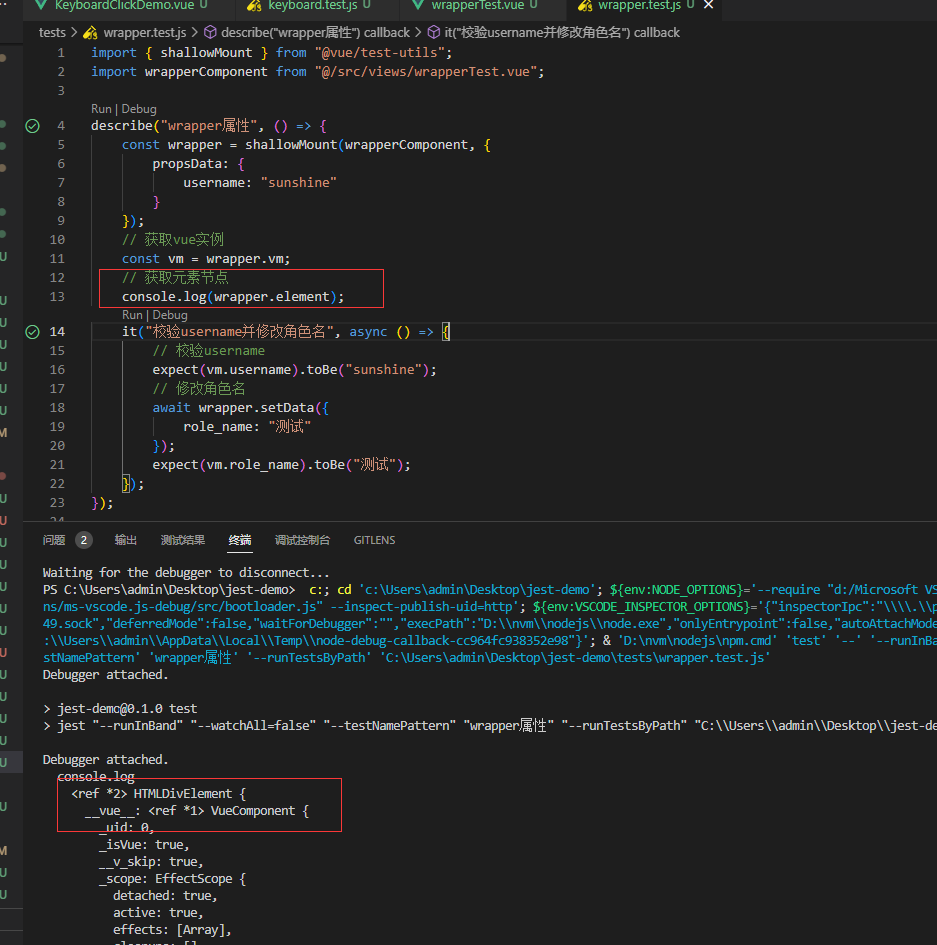
方法
attributes:用于将属性传递给组件的根元素
classes:返回节点的 class 数组
contains:判断是否包含了指定的元素或组件,下一版将废弃
destroy:销毁 vue 实例,一般在测试完毕后进行销毁
emitted:返回已经触发的事件记录
exists:断言 wrapper 或元素是否存在
find:查找 dom 节点或 wrapper(下一版本为 findComponent)
findAll:返回所有匹配的结果(下一版本为 findAllComponent)
html:返回 DOM 节点组成的字符串
get:跟 find 一样的效果,但是 get 未找到时会抛错(下一版本为 getComponent)
isVisible:判断组件是否可见,display:none; visibility:hidden 均为 false
props:获取组件的 props 属性
setChecked:设置 checkbox 或者 radio 元素的值,并改变 v-model 绑定的数据
setData:用于设置 data 中的数据
setProps:用于设置 props
setSelected:选中一个 options 选项,并改变 v-model 的值
setValue:设置一个文本控件或 select 的值并更新 v-model
text:返回文本内容
trigger:触发 DOM 事件
Foo.vue
<template>
	<div>
		<div class="title">{{ title }}</div>
		<div class="secondTitle">二级标题</div>

		<!-- 接受attributes -->
		<div id="attributes" class="my-component" v-bind="$attrs">
			<slot></slot>
		</div>

		<!-- isVisible -->
		<button v-if="showButton" @click="hiddenButton">确定</button>

		<!-- checkbox -->
		<input type="checkbox" v-model="isChecked" />

		<!-- options -->
		<select>
			<option value="volvo">Volvo</option>
			<option value="saab">Saab</option>
			<option value="opel">Opel</option>
			<option value="audi">Audi</option>
		</select>

		<!-- input -->
		<input type="text" v-model="text" />
	</div>
</template>

<script>
	export default {
		props: ["title", "secondTitle"],
		data() {
			return {
				showButton: true,
				text: ""
			};
		},
		methods: {
			setData(val) {
				return val;
			},
			hiddenButton() {
				this.showButton = false;
			}
		}
	};
</script>
wrapperMethods.test.js
import { mount } from "@vue/test-utils";
import Foo from "@/src/views/wrapper/Foo.vue";

describe("测试wrapper的方法", () => {
	it("attributes:用于将属性传递给组件的根元素。它可以用于传递除了组件的props之外的任何HTML属性", () => {
		const attributes = {
			class: "my-class",
			customAttribute: "custom-value"
		};
		const wrapper = mount(Foo, {
			attrs: attributes
		});
		console.log(wrapper.attributes());
		let div = wrapper.find("div#attributes");
		console.log(div.attributes());
		console.log(div.attributes("id"));
		console.log(div.attributes().id);
		expect(div.attributes().id).toBe("attributes");
	});

	it("classes:返回dom元素的clas数组", () => {
		const wrapper = mount(Foo);
		let classes = wrapper.find("div.title").classes();
		console.log(classes); // Array
		expect(classes.includes("title"));
	});

	it("contains:判断是否包含了指定的元素或组件", () => {
		const wrapper = mount(Foo);
		expect(wrapper.contains("div")).toBe(true);
	});

	it("destroy:销毁vue实例", () => {
		const wrapper = mount(Foo);
		/* 一些操作后 */
		wrapper.destroy();
	});

	it("emitted:记录已经触发的事件", async () => {
		const wrapper = mount(Foo);
		await wrapper.vm.$emit("setData");
		await wrapper.vm.$emit("setData", 123);

		// 判断事件是否被触发
		expect(wrapper.emitted().setData).toBeTruthy();
		// 触发的数量
		expect(wrapper.emitted().setData.length).toBe(2);
		// 校验传递过去的数据
		expect(wrapper.emitted().setData[1]).toEqual([123]);
	});

	it("exists:检查包裹器或元素是否存在", () => {
		const wrapper = mount(Foo);

		expect(wrapper.exists()).toBe(true);
		// 检查是否存在button
		expect(wrapper.find("button").exists()).toBe(true);
		// 检查是否存在class为title的div
		expect(wrapper.find("div.title").exists()).toBe(true);
	});

	it("html:返回dom生成的字符串", () => {
		const wrapper = mount(Foo, {
			propsData: {
				title: "测试标题"
			}
		});
		console.log(wrapper.findComponent("div.title").html());
		expect(wrapper.findComponent("div.title").html()).toBe(
			'<div class="title">测试标题</div>'
		);
	});

	it("isVisible:判断组件是否可见", () => {
		const wrapper = mount(Foo);
		const vm = wrapper.vm;
		// 校验原始值
		expect(vm.showButton).toBe(true);
		// 校验button是否可见
		expect(wrapper.find("button").isVisible()).toBe(true);
	});

	it("props:访问组件的props", () => {
		const wrapper = mount(Foo, {
			propsData: {
				title: "props测试标题",
				secondTitle: "二级标题"
			}
		});
		const props = wrapper.props();
		// 校验title
		expect(props.title).toBe("props测试标题");
		// 校验secondTitle
		expect(props.secondTitle).toBe("二级标题");
	});

	it("setChecked", async () => {
		const wrapper = mount(Foo);
		const checkboxInput = wrapper.find('input[type="checkbox"]');
		console.log(checkboxInput.exists());
		await checkboxInput.setChecked(true);
		// 判断是否被选中
		expect(checkboxInput.element.checked).toBe(true);
	});

	it("setData:设置data的数据", async () => {
		const wrapper = mount(Foo);
		await wrapper.setData({
			showButton: false
		});
		// 校验button是否隐藏
		expect(wrapper.find("button").exists()).toBe(false);
	});

	it("setProps:用于设置props的数据", async () => {
		const wrapper = mount(Foo);
		await wrapper.setProps({
			title: "setProps测试"
		});
		expect(wrapper.find("div.title").text()).toBe("setProps测试");
	});

	it("setSelected", async () => {
		const wrapper = mount(Foo);
		const options = wrapper.find("select").findAll("option");
		await options.at(1).setSelected();

		// 验证是否被选中
		expect(wrapper.find("option:checked").element.value).toBe("saab");
	});

	it("setValue:设置一个文本的值或select的值", async () => {
		const wrapper = mount(Foo);
		const input = wrapper.find('input[type="text"]');
		await input.setValue("测试setValue");
		console.log(wrapper.vm.text);
		expect(wrapper.vm.text).toBe("测试setValue");
	});
});
Loading...